Environment variables
Configure PicHost via environment variables (Docker / .env) or the in-app Settings page. Admins use Settings (/settings) with sidebar sections Basic, Domains & paths, Access control, Tag management, and Activity log. Most values prefer SQLite when saved; some env vars override or lock UI editing.
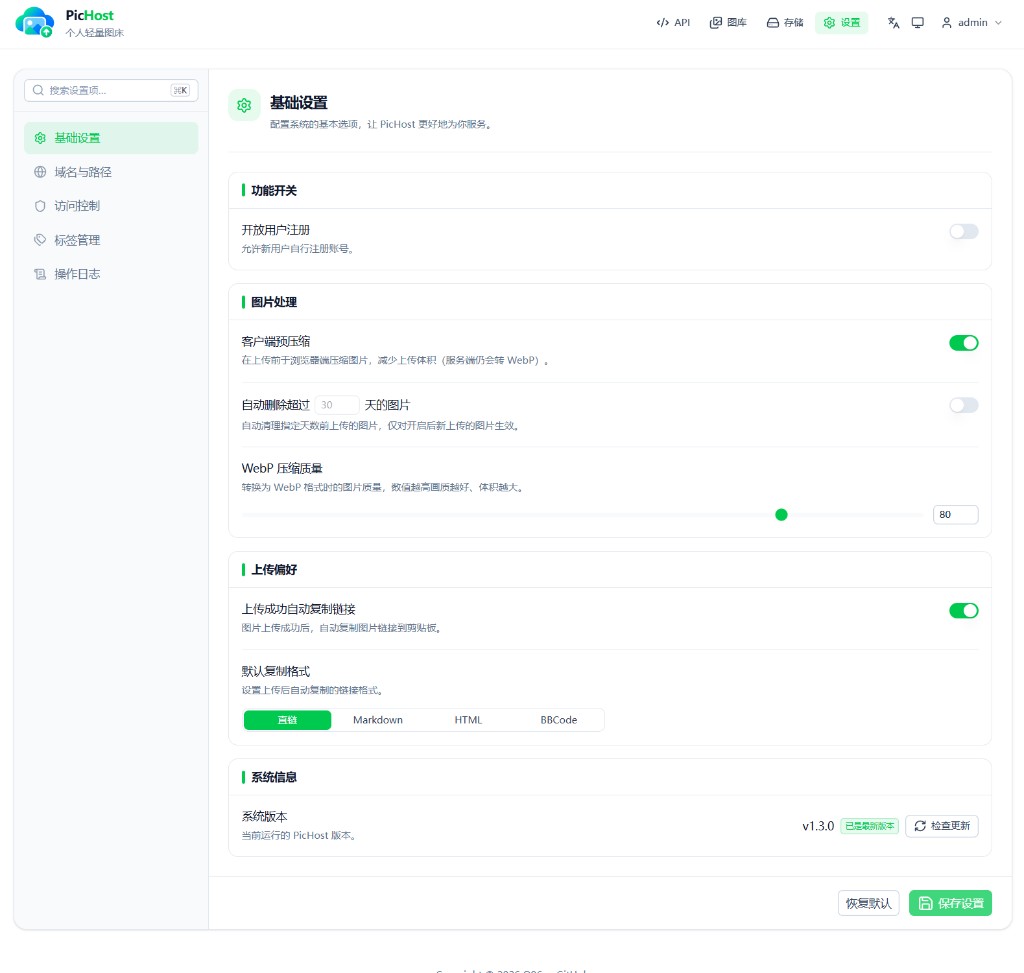
Priority overview
| Setting | Priority (high → low) | Env overrides UI |
|---|---|---|
| API upload token | Env → SQLite | Yes (cannot regenerate in UI) |
| WebP quality | SQLite → env → default 80 | No |
| Referer whitelist | SQLite → env | No |
| Site / image base URL | SQLite → env (configured in API); links use effective* or request origin | No |
| Short image links | SQLite → env → default false | No |
| Date-based paths | SQLite → env → default true | No |
| Global auto-delete days | SQLite → env → default 0 | No |
| Login verification | SQLite (Settings → Access control) | No |
Variables
API_UPLOAD_TOKEN
Token for external uploads (Twikoo, userscripts, blogs). Header: Auth-Token: <token>; form field token still works.
- Generate in API page when unset
- When set in env, it wins — UI shows “overridden by environment” and cannot regenerate
- Alias:
NUXT_API_UPLOAD_TOKEN
ALLOWED_REFERER_HOSTS
Comma-separated Referer whitelist. Own hostnames are allowed automatically. Optional; configurable in Settings.
SITE_BASE_URL / IMAGE_BASE_URL
- Site URL: admin UI, API, Twikoo upload
- Image URL: copied links and public image URLs
Single-domain: set IMAGE_BASE_URL only or leave empty (request origin). Dual-domain: hostnames must differ — see Dual-domain separation and Cloudflare deployment. Values must match proxy server_name; do not use localhost, IP, or unlisted hostnames for production admin access.
In Settings, enable dual-domain explicitly and fill both URLs; disabling clears the site URL (with confirmation). Configured values vs effective link URLs are separate in the API — see Changelog.
HIDE_FOLDER_IN_URL
true: short links (domain + filename only), e.g. img.example.com/a8K3xP.webp. false: keep date or custom folders, e.g. img.example.com/2026/08/a8K3xP.webp. Public URLs never expose the internal images/ prefix; legacy /images/... paths still work.
STORAGE_USE_DATE_PATH / STORAGE_LAYOUT
trueorSTORAGE_LAYOUT=date(default):images/YYYY/MM/id.webpfalseorSTORAGE_LAYOUT=flat:images/id.webp
Also toggled in Settings.
DATA_DIR
Root for images and SQLite. Default ./data; /data in container.
WEBP_QUALITY
Server WebP quality 1–100, default 80.
AUTO_DELETE_DAYS
Delete images older than N days globally; 0 disables. Affects new uploads after enable only. Also in Settings.
DEV_BYPASS_ACCESS
Local dev only: true bypasses login. Never use in production.
Login verification (Settings only)
Configure under Settings → Access control (stored in SQLite; no env vars):
| Method | Notes |
|---|---|
| Local slider (default) | No third-party service |
| Cloudflare Turnstile | Site key + secret key |
| Cap | API endpoint + secret |
Login and registration share the same method. If misconfigured: docker exec pichost slider (or npm run slider) resets to the slider.
Storage backends (optional)
Admins usually add backends in Storage UI; env vars such as STORAGE_BACKEND=s3 and S3_* are also supported. See Storage.
Docker Compose example
services:
  pichost:
    image: muxui/pichost:latest
    ports:
      - "6892:6892"
    volumes:
      - ./data:/data
    environment:
      SITE_BASE_URL: https://admin.example.com
      IMAGE_BASE_URL: https://pic.example.com
      API_UPLOAD_TOKEN: your-secret-token
      WEBP_QUALITY: "85"
Restart the container after changing env vars.
Settings mapping
| In-app setting | Environment variable |
|---|---|
| API token | API_UPLOAD_TOKEN |
| Referer protection | ALLOWED_REFERER_HOSTS |
| Site URL | SITE_BASE_URL |
| Image URL | IMAGE_BASE_URL |
| Hide folder prefix | HIDE_FOLDER_IN_URL |
| Date-based paths | STORAGE_USE_DATE_PATH / STORAGE_LAYOUT |
| WebP quality | WEBP_QUALITY |
| Auto-delete | AUTO_DELETE_DAYS |
| Login verification | (Settings → Access control only) |
Template: .env.example in the repo root.