Users & permissions
PicHost uses role-based access control (RBAC): admin and user. Enforcement is server-side.
Role capabilities
| Capability | Admin | User |
|---|---|---|
| Upload images | ✓ | ✓ |
| Own gallery | ✓ | ✓ |
| All galleries / uploader badges | ✓ | — |
Storage management (/storage) | ✓ | — |
System settings (/settings) | ✓ | — |
| Allow registration | ✓ | — |
| Login verification (slider / Turnstile / Cap) | ✓ | — |
| Global API token | ✓ | — |
| Personal API token | ✓ | ✓ |
| Gallery stats overview (incl. user count) | ✓ | partial |
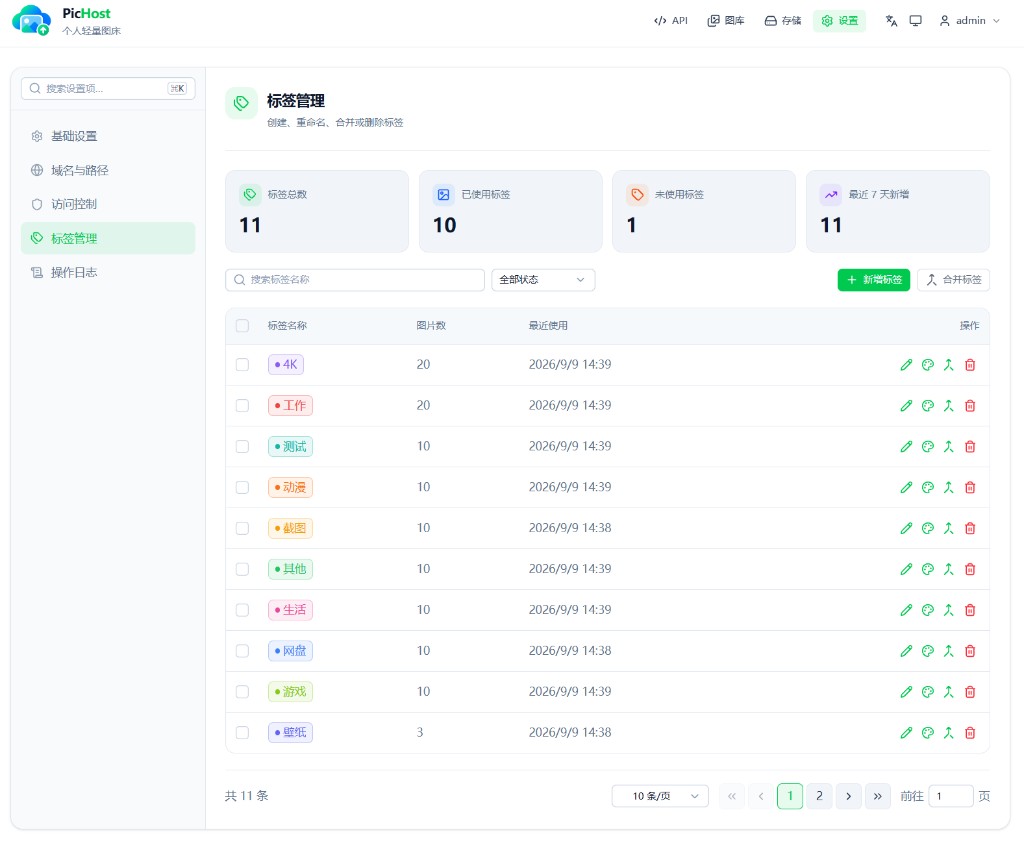
| Tag management (Settings → Tag management) | ✓ | — |
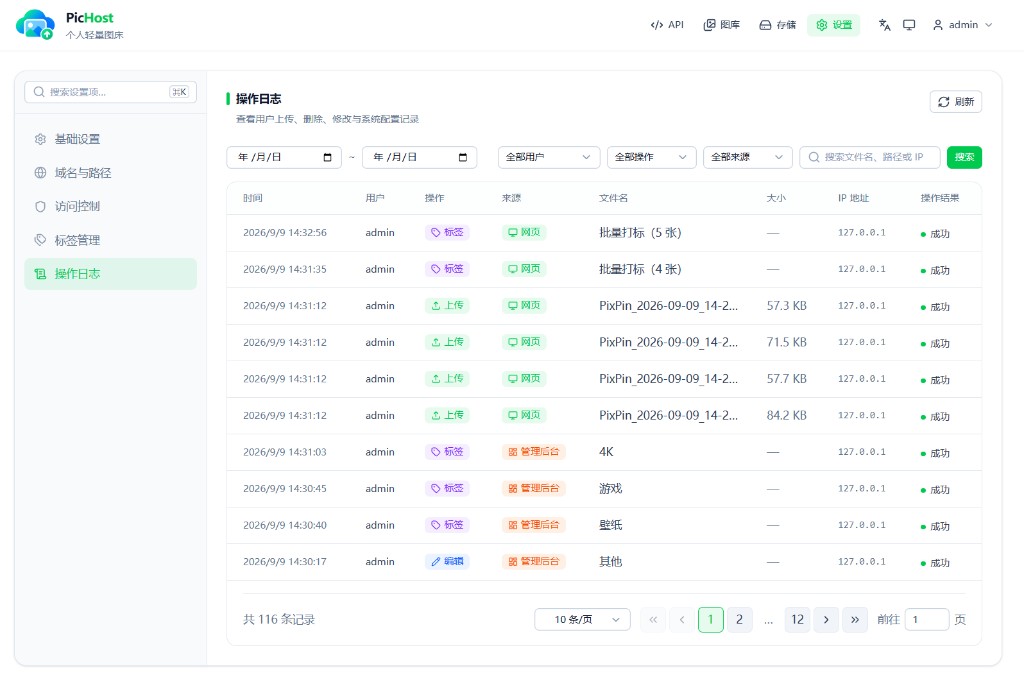
| Activity log (Settings → Activity log) | ✓ | — |
Regular users see API, Gallery in the nav; user menu: Change password, Sign out.
Auth scenarios
| Scenario | Auth | Ownership / visibility |
|---|---|---|
| Web upload | Session cookie | Current user |
| API upload + user token | Auth-Token header | Token owner |
| API upload + global token | Auth-Token header | Admin (userId null) |
Twikoo POST /api/index.php | form token | Same as global token |
| Gallery list / search / delete | Session or token | Users: own only; admin: all |
Direct link GET /images/... | None (Referer rules) | Public if URL is known |
Accounts
- By default only admins create users; allow registration is an admin setting
- Passwords hashed with scrypt
- Web login/register requires verification: local slider by default; admins can switch to Turnstile or Cap under Settings → Access control
- If verification is misconfigured:
docker exec pichost sliderresets to the local slider - Login rate limiting
Tags
- Tags are per-user: regular users manage and filter only their own tags and images
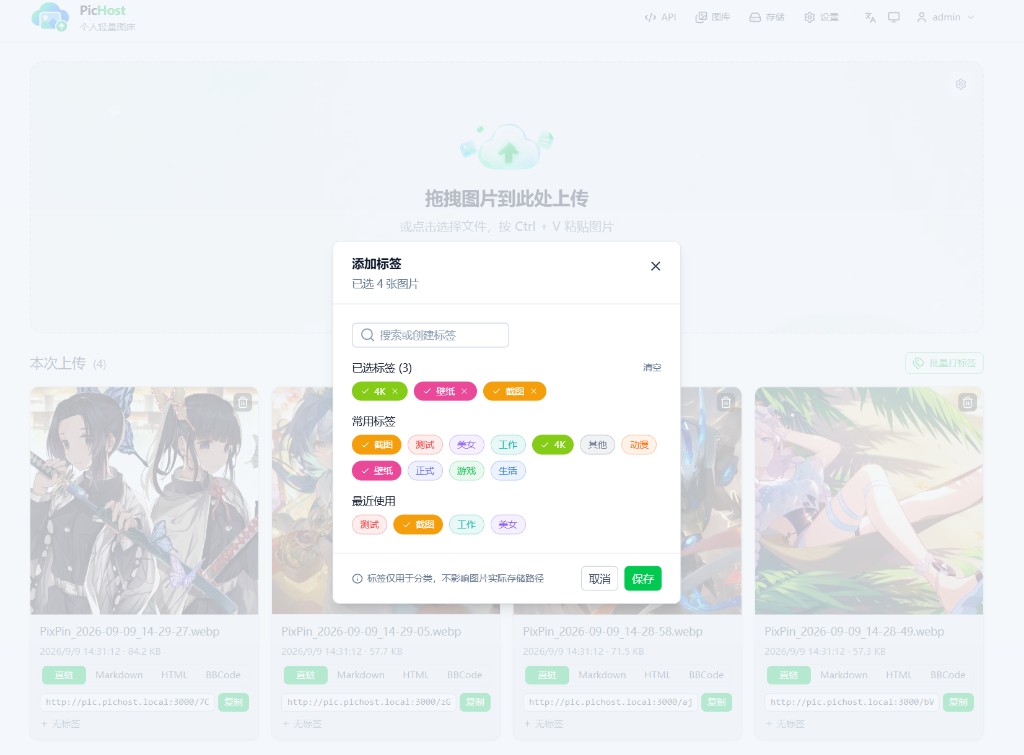
- After upload on the home page, tag one image or use batch tagging; the gallery supports tag filters (OR / AND) and batch tagging
- Admins manage tags under Settings → Tag management (create, recolor, merge, delete). Tags classify images only and do not change
images/storage paths
Activity log
Admins review uploads, deletes, logins, settings changes, tag operations, and more under Settings → Activity log, with filters for date, user, action type, and source.
Upload preferences & auto-delete
- Upload preferences: admins configure client compression and auto-copy in Settings → Basic; regular users can flip the home upload card for personal preferences
- Auto-delete: global (admin) and per-user policies; affects new uploads after enable only
API tokens
| Type | Managed by | Upload owner | Typical use |
|---|---|---|---|
| Global | Admin (API page) | Admin account | Twikoo, site-wide scripts |
| Personal | Each user (API page) | That user | Personal blog, private scripts |
API_UPLOAD_TOKEN in env locks the global token — see Environment variables.